The rules of development changed. Work is simultaneous now — across every project at once.

Orkestra — the ADE of the new paradigm.

Execution multiplied; attention did not. One developer can now see and direct more work.

The paradigm changed. The tools didn't.

  1. (01)

    Idle sessions keep consuming resources.

    Long-idle agents still occupy memory, adding another layer of process management.

  2. (02)

    Your agents are scattered across tabs and windows.

    Related work sits behind separate tabs. Following the whole project means switching between its sessions.

  3. (03)

    A new worktree has the code, not the environment.

    The env files, local data, and free ports aren't there — the copy can't boot, so the agent can't test its own work.

  4. (04)

    After a crash or reboot, the rebuild is on you.

    Layout, names, and which task belonged to which session — reconstructed by hand.

  5. (05)

    Every return starts with “where were we?”

    Before the next decision, you reconstruct the goal, what changed, and what still needs doing.

  6. (06)

    You launch, arrange, and schedule everything by hand.

    Terminals, layout, recurring runs — all manual, all yours.

  7. (07)

    One run can consume the quota you needed for the rest.

    You keep watching consumption so one task doesn’t use up the allowance reserved for other work.

  8. (08)

    You still relay every agent handoff.

    Copy, paste, explain, repeat — one agent cannot directly launch and direct another for a bounded task.

None of this is a feature gap. These tools still encode the old paradigm — one developer, one task, one project in view — though agents have already outgrown it. The context now lives with the sessions; you visit. What you need is not a better seat next to one agent. You need the room the whole day's work is in.

Some ADEs begin with a tool — a terminal, an editor. Orkestra begins with the work as it exists now. The new paradigm runs in Orkestra.

Read the manifesto: The New Paradigm of Development →

Answers: 2 · 5

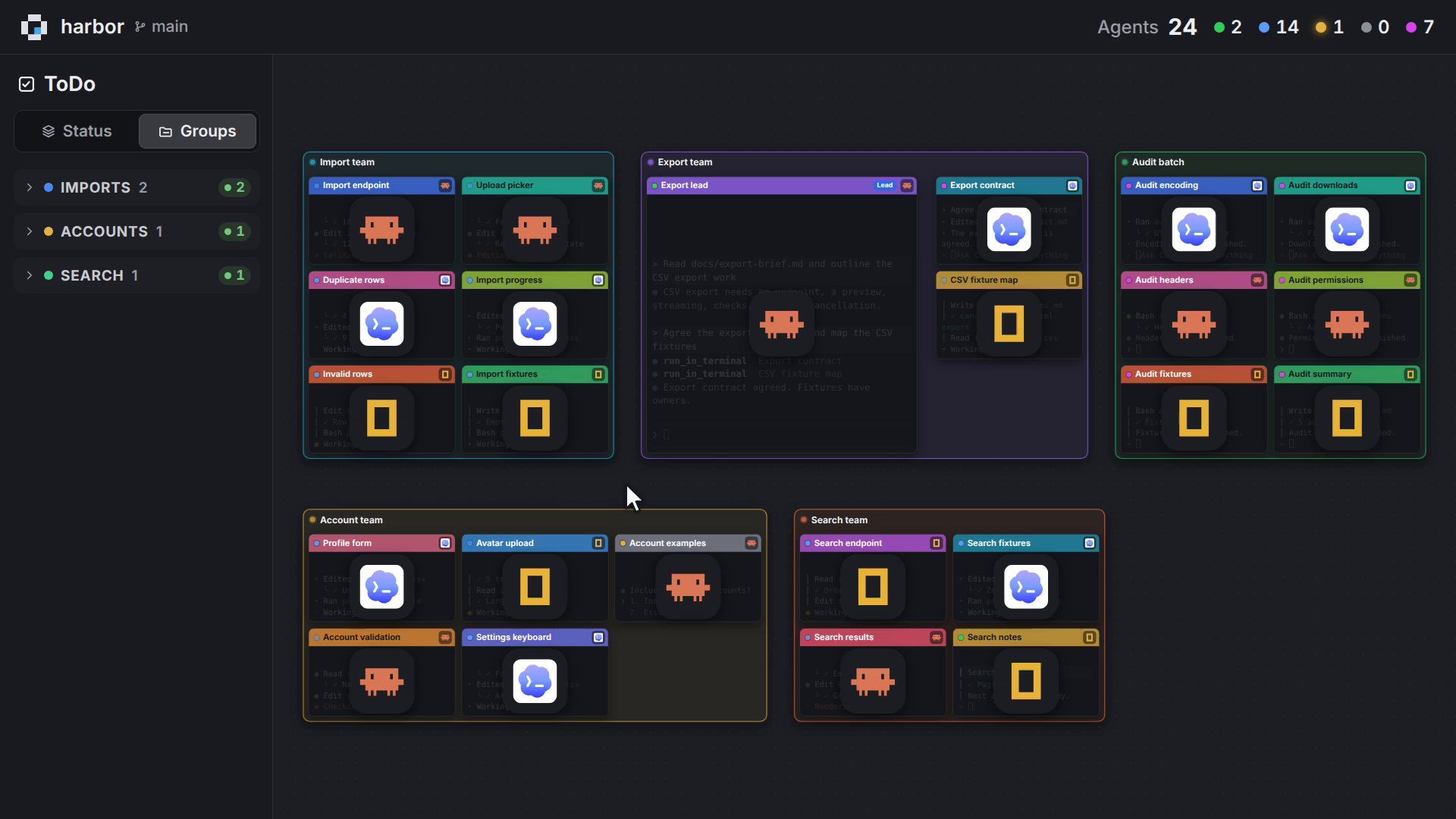
See every agent at once.

The whole workload stays visible, distinct, and easy to re-enter.

Instead of checking each silent session in turn, you can read the workload as a whole. Names, colors, and reported states make each agent easy to place; a short recap restores the thread when it is time to step back in.

  • Read each agent's state. Reported states keep active, finished, and "Awaiting input" work distinct, so the session needing you stands apart.
  • Keep everything in view. Zoom out across the canvas or check the minimap to read the whole workload together.
  • Recognize every terminal. Names and colors distinguish each session; worktree and task-group colors keep related work together.

Answers: 6 · 8

Let agents act wherever developers can.

Any provider, any harness, any project: agents work natively, and developers retain control over agents and development.

Orkestra ships a fully integrated MCP server — Full-Surface MCP — a control registry of many tools covering projects, task boards, terminals, launchers and harnesses, working files, version control, and scheduling. Flip one toggle and every agent you launch can operate the environment it runs in: create tasks, open terminals, provision worktrees, launch siblings. Every human-operable capability has an agent-operable MCP equivalent.

  • Sub-agents with a UI. An agent calls open_agent_terminal — a new window appears on your canvas, task created, agent launched. The caller commands it, answers the prompt it's stuck on, waits for it to go idle, reads its output, recaps it. Harness choice does not set the collaboration boundary: through Orkestra, one agent can launch, guide, and message another on any other harness. You see both sides; you can take either over.
  • One switch. Launch is controlled by a single switch; an integrated launcher loads the MCP configuration and the skills the agent needs automatically.
  • Scoped per project. The MCP surface is configured per project — with per-project restrictions on what an agent may reach.

Agents follow a documented protocol across the shared, visible workspace, sending messages into one another's terminals while their dispatch trees remain visible. Orkestra hides nothing and enforces nothing. Auto-attach is one setting away.

Answers: 4

Reboot. Reopen. Carry on.

After a reboot, your workspace returns as you left it, with sessions paused and ready to continue.

After a quit, crash, or reboot, Orkestra fully restores the workspace you were using, so you return to the work instead of rebuilding it. Every session comes back dormant, with its history readable. When you choose, one click reconnects it and the agent continues from its own saved conversation.

  • Power cut, workspace restored. Reopen to every window and readable thread, with sessions waiting dormant.
  • Yesterday is still findable. Find a closed session by what it was doing, then reopen its conversation.
  • Continue mid-thread. The agent returns to its own saved conversation, not a blank prompt.

Layout and identity restore; live processes do not. Resuming re-reads the agent's own saved transcript and depends on it still existing; on-screen output is not replayed into the live terminal.

Answers: 3

Worktrees are working projects, not file copies.

The worktree goes beyond tracked files: a project the agent can run and test before merging.

Creating a worktree used to mean copying tracked files into another directory. Orkestra turns that action into a working version of the project: it brings across the environment you declared, assigns separate ports, and lets the agent run the app and test its change before you merge.

  • The environment arrives too. Declared env files, local config, certificates, and data directories come across with the new branch.
  • The app starts here. After dependencies install, the new worktree boots the real application on ports of its own.
  • Test before the merge. The agent runs integration tests, e2e flows, or manual checks inside the worktree it changed.

You declare once per project what belongs to the environment; dependencies still install in the worktree. Orkestra provisions and the agent tests — the merge decision stays yours.

Answers: 6

You direct the ADE end-to-end through Telegram.

From Telegram, you reach every project and agent; one provider-neutral scheduler launches any integrated harness across projects.

Telegram provides remote control of the development environment itself — not a single harness's remote — so you can open any project, check every agent, and direct the one that needs you. And across every project, one Orkestra scheduler launches a task or group on any integrated harness, regardless of provider.

  • The ADE has the remote. Through Telegram, open any project, inspect every agent, and send the selected agent a command.
  • Not a harness remote. Telegram remote control covers the environment itself: every project and every agent, whatever its harness.
  • Scheduling stays harness-agnostic. One Orkestra scheduler launches tasks or groups on any integrated harness, from any provider, across projects.

Remote control is opt-in and off until you pair a device; remote commands and scheduled launches run while Orkestra is running, including minimized.

Answers: 1 · 7

Orkestra carries the resource burden.

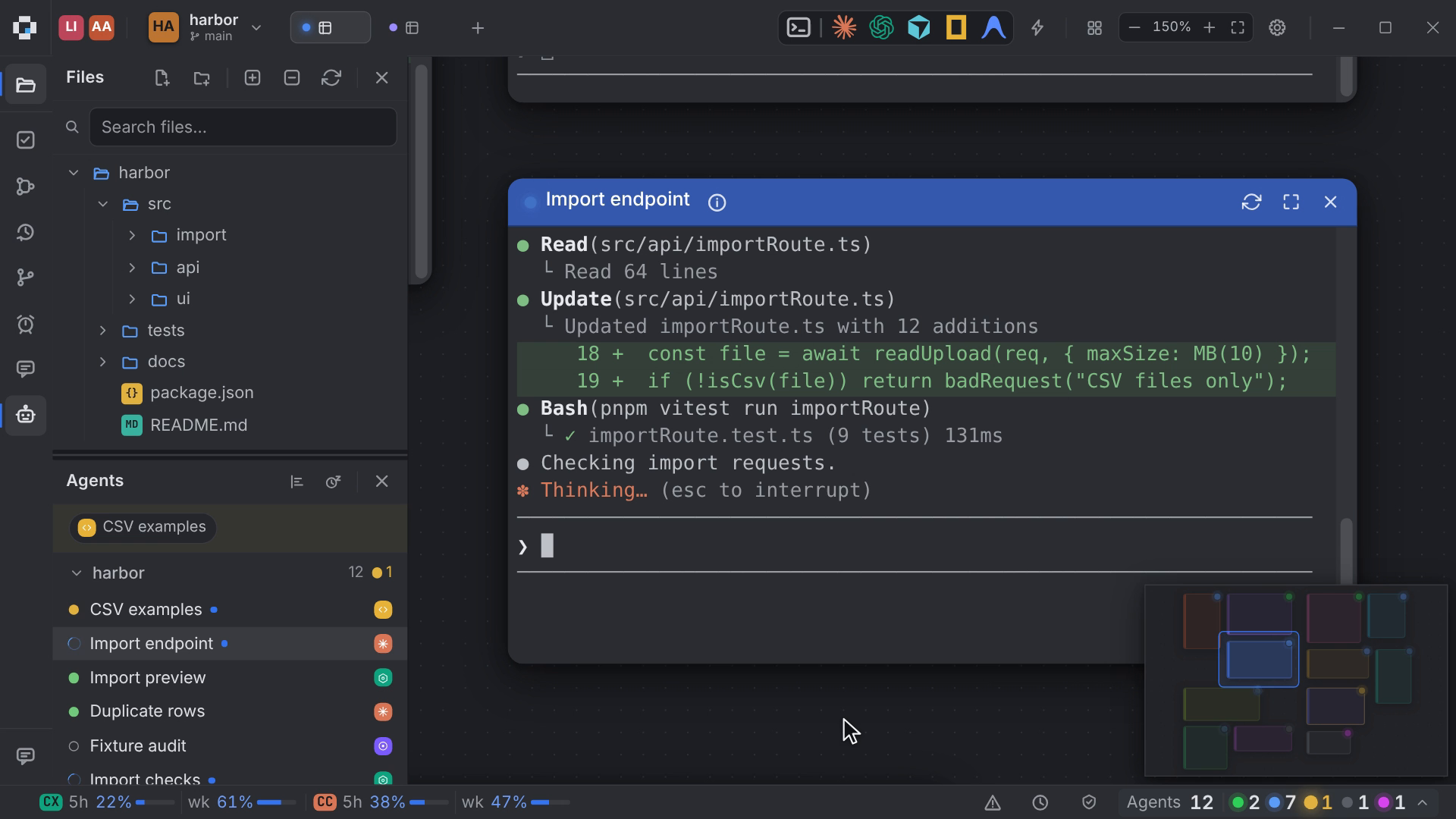
Orkestra tracks every agent's load live, sleeps long-idle agents automatically, and brings them back on one click.

Orkestra reduces the process and memory cost of running many agents on one machine. An idle terminal can end its process tree without losing its place or conversation; hidden output gets lighter handling. It tracks each agent's load live, automatically sleeps long-idle terminals, and wakes them with one click, handling the resource work for you.

  • Sleep frees memory, not access. Orkestra automatically ends long-idle process trees; last output, recap, and transcript remain readable.
  • Wake in one click. The agent resumes the same conversation from the harness's own transcript, with its window and task link intact.
  • See every load live. Follow each agent's resource use in real time without inspecting processes yourself.

Sleep releases the process; waking resumes the agent's own saved conversation. Automatic idle sleep never stops working agents or agents waiting on you. Budget protection adds token, estimated-cost, and quota-percentage thresholds for supported agents, with your chosen response when reported usage reaches them.

Deep integration. One working interface.

Your agents can run the workspace, work together, and carry knowledge across sessions.

Through Orkestra's MCP, a harness can create tasks, launch other harnesses, inspect their sessions, and exchange messages. Shared Notebooks keep project knowledge available across harnesses and sessions.

What a harness can do is its own — Orkestra unifies the control, not the capability.

Everything Else, Briefly.

Daily project tools, kept close to the work they support.

  • Task Board

    Group and filter tasks; launch agents in-project, with task text preloaded and updates written back.

    Task Launch Setup

    Choose each launch's model, permissions, auto-run, and repo or fresh-worktree mode, validated live by the harness.

  • File Highlights

    Browse the file tree; mark files and folders with colors.

    Visual Markdown

    Edit Markdown visually, including tables, media, frontmatter, and code. Task descriptions autosave.

  • Agents Panel

    View runtime indicators for every agent and switch to any terminal in one click.

    Usage Gauges

    View live usage readings where a harness publishes a source.

  • Source Control

    Use auto-generated commit messages, group files in staging, and inspect branches and diffs.

    Session History

    Browse closed sessions in the sidebar; restore work by its retained name and recap.

  • Native Alerts

    Get an OS notification and sound when needed; agents can raise the signal and message you in Telegram.

    Proxy-Native

    Route every app-originated outbound request through the configured proxy environment for restricted corporate systems.

What we can show.

A working product, used to build itself from the start.

The environment described above is also where Orkestra itself is built. Since the bootstrap build, its builders have used the app to develop every version that followed.

Get Orkestra.

Download for Linux, or request a release notification for macOS and Windows.

  • Available now

    Linux

  • In active development

    macOS

    One email when the build ships. Nothing else.

  • In active development

    Windows

    One email when the build ships. Nothing else.

Start with the ADE of the new paradigm.

Download Orkestra, and widen what one developer can direct.

All the work is visible. Conduct what comes next.

Good to know.

  • An Agentic Development Environment is built for developers directing many agents across simultaneous flows, even within one project. Development has shifted from serial to simultaneous, making developer attention the scarce resource. This era created the category. Orkestra is the ADE of the new paradigm: a desktop canvas for running, viewing, and directing CLI coding agents.

  • Orkestra supports an integrated roster of CLI coding harnesses, regardless of provider. Every integrated harness supports task launching, session resume, live model selection, permission modes, and self-reported status. You can also build or modify launchers with custom environment variables, arguments, and providers.

  • No. You use the harness subscriptions you already have. Orkestra adds no model billing and does not resell tokens.

  • Orkestra restores the workspace to its full previous state, preserving the position of every agent and its session.

  • Orkestra creates a git worktree and carries over the declared environment in a single action: environment files, configuration, certificates, data, and separate ports. The result is a working project instance where the agent can run the app and test changes before merging.

  • Full-Surface MCP gives launched agents explicit access to create tasks, open terminals, provision worktrees, and launch or message sibling agents across harnesses. Cross-harness work follows a documented protocol and remains visible. Nothing is hidden or enforced automatically. You can restrict what agents may reach per project.

  • A paired Telegram bot lets you control every project and agent. A remotely controlled agent connected to Orkestra's MCP server can also operate the environment. A mobile app is in development. Remote access and schedules work while Orkestra is running.

  • No. Connect an Orkestra project to its JetBrains or VS Code project. Move into the IDE for deep code work, then return to Orkestra and continue the agent session.

  • Yes. Every outbound request made by the app routes through your configured proxy.

  • Orkestra is free. You use the harness subscriptions you already have; Orkestra adds no model billing and resells no tokens.